WhatsApp Business API Guide: Setup, Pricing, BSPs (2026)
WhatsApp Business API explained: how it works, per-message pricing, top BSPs, Shopify integration, and a step-by-step setup checklist for e-commerce.
 Nicolas ProvostMar 25, 2026 · 15 min read
Summarize this article with an AI
 ChatGPT
 Claude
Table of contents (45)
Key takeaways
- The WhatsApp Business API lets a business send and receive WhatsApp messages at scale, with templates, automation and a multi-agent inbox the app lacks.
- Access is free, but Meta charges per delivered template message by category and recipient country, for example $0.0635 per marketing message in the UK.
- New API accounts start with a messaging limit of 250 unique contacts per 24 hours, which rises as the quality rating improves.
- Kanal installs from the Shopify App Store, handles the API setup and passes Meta's WhatsApp fees through at cost, with plans from $89 a month.
The WhatsApp Business API transforms WhatsApp from a manual messaging tool into a fully automated e-commerce powerhouse. Unlike the free WhatsApp Business app, the API enables unlimited team access, AI chatbots, automated workflows, and deep integration with your Shopify store.
This guide covers everything: what the API is, how much it costs, how to set it up, and how to maximize ROI for your e-commerce brand.
What Is the WhatsApp Business API?
The WhatsApp Business API (now called WhatsApp Business Platform by Meta) is a programmatic interface that lets businesses send and receive WhatsApp messages at scale. It's designed for medium to large businesses that need automation, multiple agents, and WhatsApp CRM integration.
WhatsApp Business App vs API
| Feature | WhatsApp Business App | WhatsApp Business API |
|---|---|---|
| Price | Free | Per-message pricing |
| Devices | 1 phone + 4 linked | Unlimited |
| Contacts per broadcast | 256 max | Unlimited |
| Message templates | No | Yes (pre-approved) |
| Automation | Quick replies only | Full flows + AI chatbots |
| Shopify integration | Manual | Native (Kanal) |
| Analytics | Basic read receipts | Opens, clicks, conversions, ROAS |
| Team inbox | No | Multi-agent with routing |
| CRM integration | No | Klaviyo, Gorgias, Zendesk, etc. |
If you're doing more than 50 customer conversations per day or want to automate cart recovery and campaigns, you need the API. For a deeper side-by-side look, see our WhatsApp Business app vs API comparison.
WhatsApp Business API Pricing
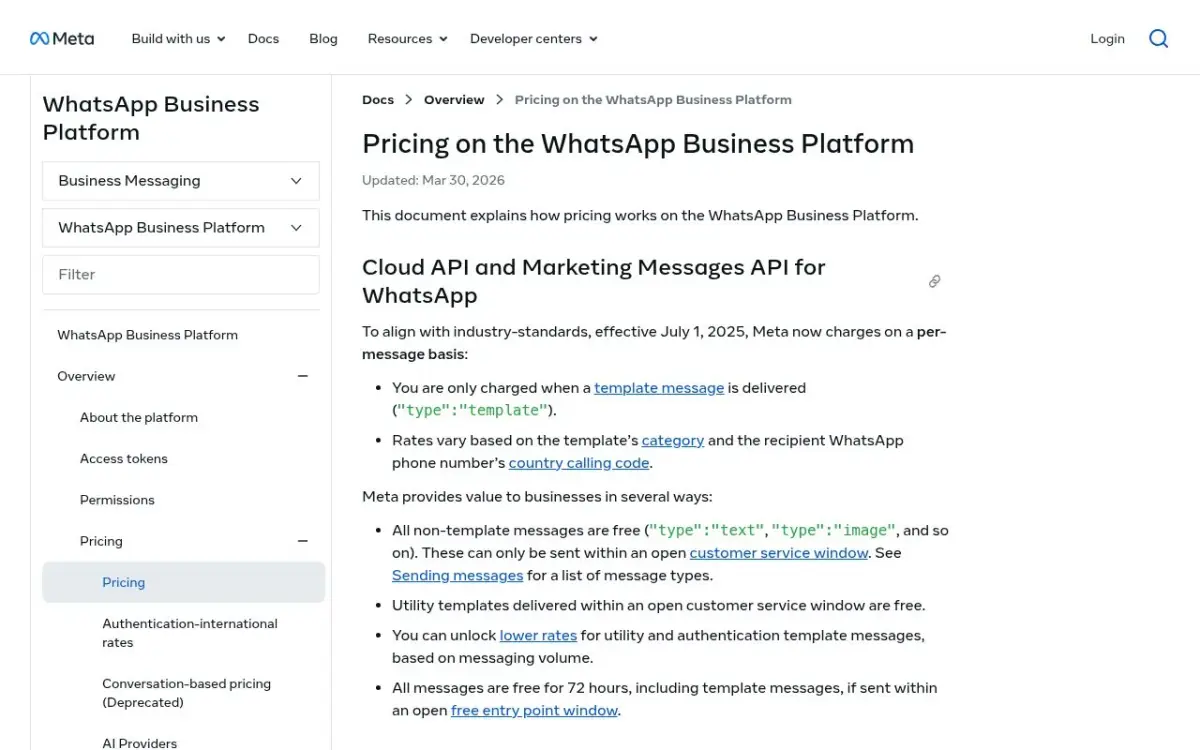
Since July 1, 2025, Meta charges per delivered message, not per conversation, as laid out in its official pricing documentation. You pay when a template message is delivered, at a rate set by its category and the recipient's country. Each customer message opens a 24-hour customer service window in which you can reply freely: these service replies were not charged until September 30, 2026. Since October 1, 2026, they cost the utility rate after 1,000 free service messages per business phone number each month.
Message Categories & Costs (2026)
| Category | Description | Cost (US) | Cost (France) |
|---|---|---|---|
| Marketing | Promotions, offers, campaigns | $0.0250 | $0.0859 |
| Utility | Order updates, shipping, receipts | $0.0034 | $0.0300 |
| Authentication | OTP codes, login verification | $0.0034 | $0.0300 |
| Service | Your replies inside the 24-hour customer service window (not a template) | Utility rate after 1,000 free per number each month | Utility rate after 1,000 free per number each month |
Prices are per delivered message, in USD, from Meta's rate card effective July 1, 2026 (Meta's pricing). US prices are Meta's North America rates. Since October 1, 2026, a service message costs the utility rate of its market, after 1,000 free service messages per business phone number each month.
Cost Example: Shopify Store with 10,000 Customers
The volumes below are illustrative assumptions: replace them with your own store's numbers. Costs use Meta's UK rates per delivered message (Meta's pricing): $0.0635 per marketing message and $0.0220 per utility message. (Meta has paused marketing templates to US numbers since April 1, 2025, see our US guide, so a US store would not send the marketing lines.)
| Use Case | Monthly Messages | Cost |
|---|---|---|
| Cart recovery (15% of carts) | 1,500 marketing | $95.25 |
| Order notifications | 3,000 utility | $66.00 |
| Customer support | 500 service | Not charged (within the 1,000 free since Oct. 1, 2026) |
| Monthly campaign | 5,000 marketing | $317.50 |
| Total | 10,000 | $478.75 |
To judge whether that bill pays off, compare it with the revenue your flows bring back, measured against a holdout group that does not receive the messages. For a full breakdown of every message category and how to model your monthly bill, see the WhatsApp Business pricing guide.
Check Kanal's transparent pricing: we pass WhatsApp (Meta) fees through at cost, with no per-message markup, and plans start from $89/month. The pricing page includes a cost simulator that shows your total, WhatsApp fees included.
How to Set Up the WhatsApp Business API
Option 1: Direct Setup (Complex)
- Create a Meta Business Account
- Verify your business (takes 2-14 days)
- Apply for WhatsApp Business API access
- Set up a cloud hosting environment
- Configure webhooks for incoming messages
- Build message templates and submit for approval
- Integrate with your tech stack
This requires significant developer resources and ongoing maintenance.
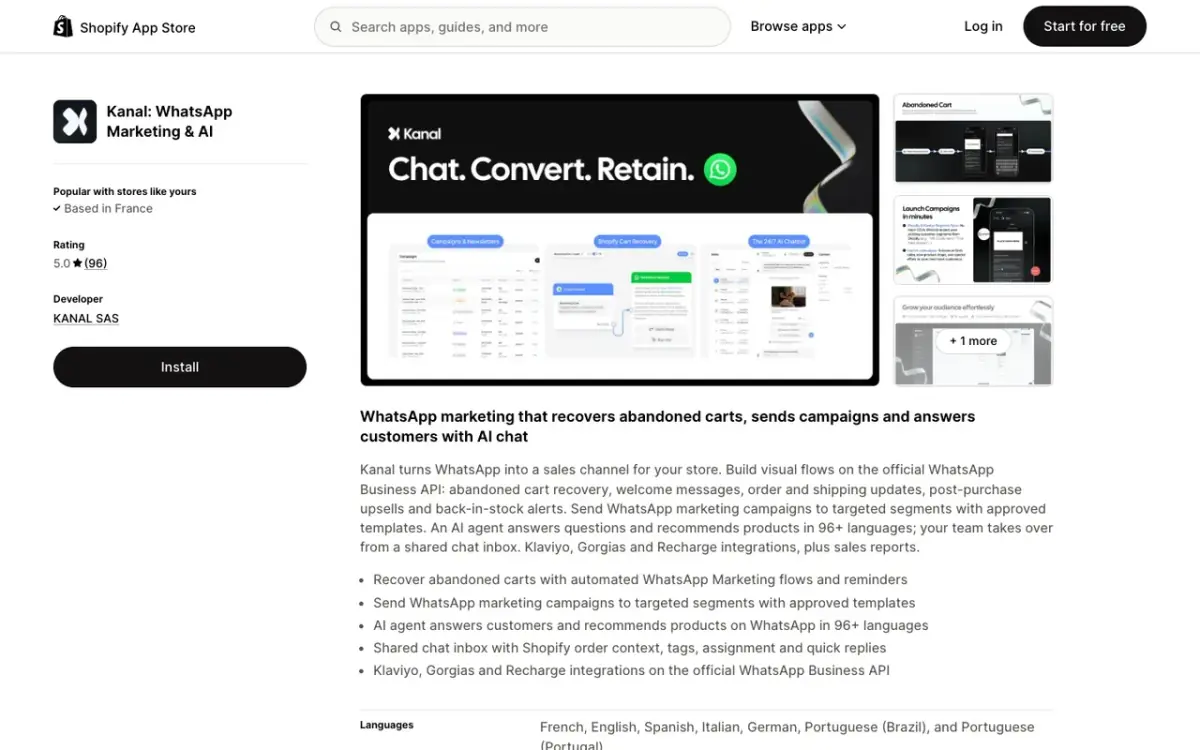
Option 2: Via a Platform Like Kanal (Recommended)
- Install Kanal from the Shopify App Store
- Connect your WhatsApp number (guided setup, takes 10 minutes)
- Kanal handles the Meta verification and API setup
- Start sending automated messages immediately
With Kanal, you skip the complex technical setup and get a visual dashboard for managing everything: campaigns, cart recovery, AI chatbot, and order notifications.
Key WhatsApp Business API Features
Message Templates
Template messages are pre-approved message formats that let you initiate conversations with customers. They can include:
- Text with dynamic variables ({customer_name}, {order_number})
- Media headers (image, video, or document)
- Interactive buttons (quick replies or URL buttons)
- Call-to-action buttons (call phone number, visit website)
Templates must be submitted to Meta for approval before use. Most templates are approved within 1-24 hours.
Automated Flows
Build visual message flows triggered by customer actions:
- Abandoned cart: Auto-send reminder 1h, 24h, 72h after cart abandonment
- Post-purchase: Send product recommendations after purchase
- Back-in-stock: Notify customers when wishlist items are available
- Welcome series: Onboard new subscribers with multiple touchpoints
- Review collection: Request reviews after delivery confirmation
AI Chatbot
The AI chatbot powered by the WhatsApp Business API can:
- Answer product questions from your catalog
- Track orders in real-time (synced with Shopify)
- Handle returns and refund requests
- Recommend products based on browsing history
- Escalate to human agents when needed
Our WhatsApp chatbot for ecommerce guide walks through the setup, ready-to-use flows, and how to measure the results.
Multi-Agent Inbox
Multiple team members can manage conversations simultaneously:
- Conversation routing based on topic or language
- Internal notes for team collaboration
- Assignment rules for load balancing
- SLA tracking to maintain response times
Integrate with Gorgias or Zendesk for enterprise-grade support workflows.
WhatsApp Business API + Shopify Integration
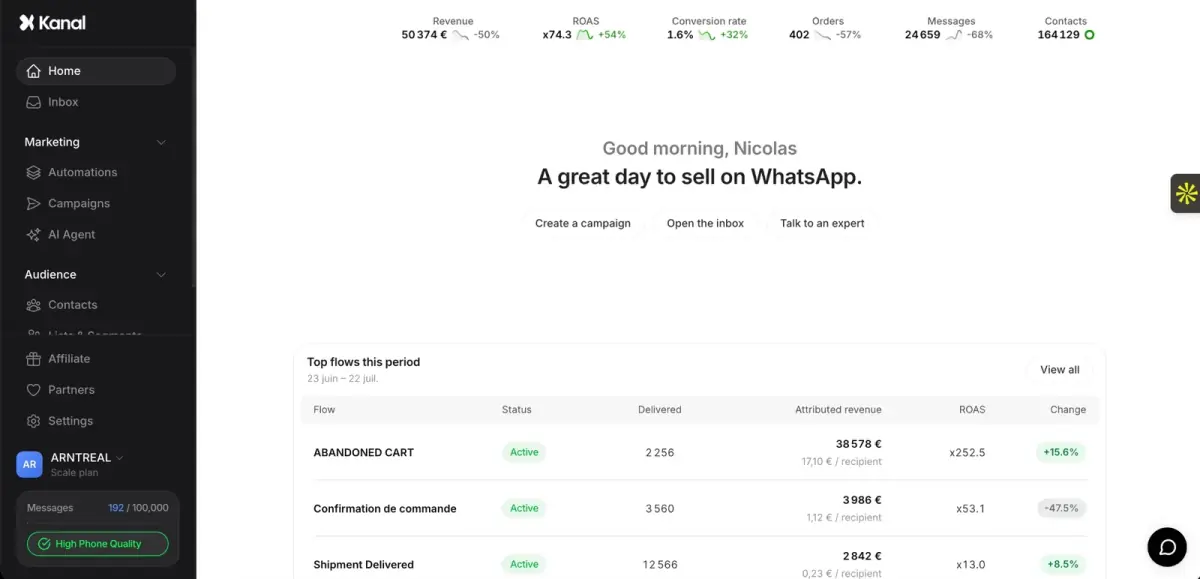
Kanal's Shopify integration syncs your store data with WhatsApp for automated, personalized messaging:
What Gets Synced
- Customer data: Name, email, phone, purchase history
- Order events: New order, fulfilled, delivered, cancelled
- Cart data: Items, quantities, prices, discount codes
- Product catalog: Inventory, prices, images
- Customer segments: VIP, repeat, one-time, at-risk
Automated Workflows
Once connected, these workflows run automatically:
- Cart recovery: Customer abandons cart → WhatsApp reminder with product image + discount code → customer returns to the checkout from the message
- Order confirmation: Order placed → WhatsApp confirmation with order details
- Shipping update: Order shipped → WhatsApp notification with tracking link
- Review request: Order delivered → WhatsApp request for product review
- Win-back: No purchase in 30+ days → WhatsApp offer to re-engage
CRM Integrations
- Klaviyo: Sync WhatsApp with your email/SMS flows, use Klaviyo segments for WhatsApp targeting
- Gorgias: Manage WhatsApp conversations alongside email/chat/social support
- Loyoly: Reward loyalty points for WhatsApp engagement
- Splio: Enterprise marketing automation with WhatsApp channel
- Zendesk: Enterprise support ticketing with WhatsApp
Migration Guide: From the Free App to the API
Many Shopify brands start with the free WhatsApp Business app and outgrow it. Here's how to migrate without losing data or messaging history.
Step 1: Audit your current setup
Before migrating, document:
- Current phone number (the one tied to your WhatsApp Business app)
- Connected devices (WhatsApp Web sessions, linked phones)
- Saved replies, labels, broadcasts
- Customer chat history (will be deleted on migration)
- Catalog and quick replies (these can be re-imported)
Step 2: Backup your chat history
API migration disconnects the app, which deletes local chat history. Before starting:
- Open WhatsApp Business app, go to Settings > Chats > Chat backup
- Run a manual WhatsApp backup to Google Drive or iCloud
- Export specific conversations: Chat > More > Export chat (includes media)
- Save catalog product data via screenshots or notes
Step 3: Choose your API path
| Path | Time to live | Cost | Best for |
|---|---|---|---|
| Direct via Meta | 2 to 4 weeks | Dev resources required | Engineering teams |
| BSP (Twilio, Wati) | 3 to 7 days | Setup + monthly fees | Mid-market |
| Kanal | 10 to 30 minutes | From $89/month | Shopify e-commerce |
Step 4: Port your number
Both direct and BSP migrations require porting your existing number to the API:
- Submit number port request through your chosen platform
- Confirm OTP code received on the WhatsApp Business app
- App is automatically logged out and disabled
- Number becomes API-only (you can no longer use the mobile app on the same number)
Step 5: Re-establish customer touchpoints
After migration:
- Re-import contacts via CSV (Shopify customers can be synced automatically with Kanal)
- Submit your most-used templates for Meta approval
- Set up automated cart recovery and order notifications
- Test all flows end-to-end before announcing the change to customers
WhatsApp Business API Rate Limits Explained
Meta enforces strict rate limits on outgoing messages. Understanding them is critical for scaling campaigns.
Messaging tiers
New business portfolios start at 250 unique customers per 24 hours and move up as described on Meta's messaging limits page (read on October 8, 2026):
| Limit (unique customers/24h) | How to unlock |
|---|---|
| 250 | Default for new business portfolios |
| 2,000 | Complete a scaling path: verify your business, have your partner verify it, or send 2,000 delivered messages outside customer service windows within 30 days using high-quality templates |
| 10,000 | Automatic: high-quality messages and at least half of the current limit used in the last 7 days |
| 100,000 | Same rule |
| Unlimited | Same rule |
The fastest way to climb tiers: send well-targeted templates with low opt-out rates and high engagement. If you go the BSP route, our comparison of WhatsApp Business API providers breaks down throughput and pricing across the main players.
Throughput limits
Within your tier, you also have throughput limits per second:
- Cloud API hosted by Meta: 80 messages per second by default, scalable to 1,000 messages/sec on request
- BSP-hosted setups: usually capped lower, depending on the provider's infrastructure
For broadcast campaigns to 100,000+ contacts, plan to spread sends over a few hours rather than all at once.
Quality Rating: How to Keep Your Number Healthy
Meta scores every WhatsApp Business number on a quality rating: Green (high), Yellow (medium), or Red (low).
What hurts your quality rating
- High opt-out rate after your sends
- High block rate (customers blocking your number)
- Low message engagement (unread or unanswered)
- User reports of spam or unwanted content
- Sending non-compliant template content
What boosts your quality rating
- Strict opt-in collection with clear value proposition
- Personalized templates with merge fields (name, order ID)
- Two-way conversational flows (with quick replies or AI chatbot)
- Honoring opt-outs immediately (Meta watches for this)
- Limiting marketing send frequency to weekly or bi-weekly
Consequences of a low rating
- Yellow: messaging tier capped at current level (no further growth)
- Red: account flagged for review, potential 30-day suspension
- Repeat Red: permanent ban of the phone number from WhatsApp Business
Kanal automatically tracks your quality rating and alerts you before it drops, with built-in opt-out handling and template optimization.
Common WhatsApp Business API Mistakes
These are the mistakes to avoid when you move a Shopify store to the API.
Mistake 1: Skipping template categorization
In the UK, sending an order confirmation as a marketing template costs $0.0635 per delivered message instead of $0.0220 as a utility template (Meta's pricing). Always categorize properly when submitting templates to Meta.
Mistake 2: Buying contacts or scraping numbers
Meta cracks down on bought lists fast. Numbers used to message non-opted-in contacts are frequently banned within days. Build your list organically through opt-in popups, checkout, and WhatsApp link generators.
Mistake 3: Ignoring template approval status
A campaign scheduled before Meta approves the template will fail silently. Always wait for the approval webhook (or check status via your platform) before launching.
Mistake 4: Using personal phone numbers
Once a number connects to the WhatsApp Business API, it can no longer use the consumer or Business app. Don't migrate your personal phone number.
Mistake 5: Underestimating Meta verification time
For brands with no prior Meta Business presence, verification can take 2 to 14 days. Start the process before you need to launch your first campaign.
Mistake 6: No fallback channel
If a customer doesn't have WhatsApp, your message simply doesn't deliver. The strongest stacks combine WhatsApp, SMS, and email with smart fallback rules. With Klaviyo + Kanal, the WhatsApp messages are triggered from your Klaviyo flows, next to the email and SMS steps you keep in Klaviyo.
WhatsApp Business API vs Competitors
| Platform | WhatsApp API | SMS (Postscript) | Email (Klaviyo) | Push Notifications |
|---|---|---|---|---|
| Rich Media | Yes | No (SMS) / Yes (MMS) | Yes | Limited |
| Automation | Advanced | Advanced | Advanced | Basic |
| AI Chatbot | Yes | No | No | No |
| Two-way Chat | Yes | Limited | No | No |
| Cost per Contact | $0.0250/US marketing message (Meta's pricing) | $0.01-0.05/msg | $0.01-0.05/contact/mo | Free |
WhatsApp works alongside email and SMS rather than replacing them. Compare open, click and reply rates per channel in your own reports. With Klaviyo integration, you can orchestrate all channels from a single platform.
Compare the best Shopify marketing apps to build your optimal stack, including the best abandoned cart apps and best SMS apps.
FAQ
Is the WhatsApp Business API free?
The API itself is free to access. Meta charges per delivered template message, at published rates that depend on the category (marketing, utility, authentication) and the recipient's country. Replies inside the 24-hour customer service window were not charged until September 30, 2026. Since October 1, 2026, they cost the utility rate after 1,000 free service messages per business phone number each month.
How long does WhatsApp Business API setup take?
With a platform like Kanal, setup takes about 10 minutes. Direct setup through Meta can take 2-4 weeks including business verification.
Can I keep my existing WhatsApp number?
Yes. You can port your existing WhatsApp Business number to the API. Note that this will disconnect it from the WhatsApp Business app, and you'll manage everything through the API platform.
What's the difference between WhatsApp Cloud API and On-Premise API?
Meta now recommends the Cloud API for all new implementations. It's hosted by Meta, requires no server infrastructure, and receives updates automatically. The On-Premise API is deprecated. Our WhatsApp Cloud API vs On-Premise comparison covers the full migration picture.
How many messages can I send per day?
New API accounts start with a messaging limit of 250 unique contacts per 24 hours. This rises to 2,000 once you complete one of Meta's scaling paths (business verification, for example), then automatically to 10,000, 100,000 and unlimited as long as you send high-quality messages and use at least half of your current limit.
Conclusion
The WhatsApp Business API is the infrastructure that powers scalable e-commerce messaging. Whether you need automated cart recovery, AI customer support, or mass marketing campaigns, the API provides the tools to do it at scale.
The easiest way to get started: Install Kanal on your Shopify store. We handle the API setup, Meta verification, and provide a visual dashboard for all your WhatsApp commerce needs.
Also worth reading: Shopify itself now includes a WhatsApp channel in Shopify Messaging (see its pricing, features and limits), and if you sell to American customers, check what the Meta pause changes in our WhatsApp marketing USA guide.
Book a demo to see Kanal running on a Shopify store, or start with our WhatsApp tools: Link Generator | Number Checker | QR Code Generator
See Kanal on your own store
- Your campaigns and cart reminders on WhatsApp, starting from your own store
- Post-purchase offers, back-in-stock alerts, then the AI agent that advises your customers
- You leave with the plan that fits and its price
From €89/month
- brands
- 500+
- to set up
- 5 min
- open rate on WhatsApp
- +90%
Nicolas helps e-commerce brands grow revenue with WhatsApp marketing. With deep expertise in Shopify ecosystems and conversational commerce, he shares proven strategies for abandoned cart recovery, broadcast campaigns, and AI-powered customer engagement.